
Security Camera No Wifi: Reliable Surveillance Without Internet
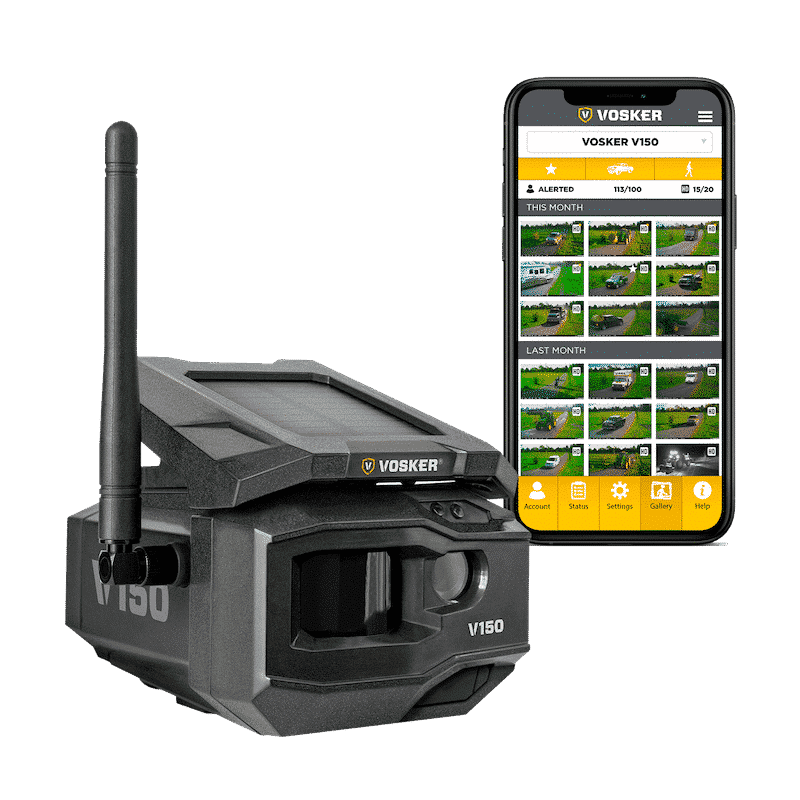
Security cameras without WiFi offer unique benefits. They are reliable and often easier to set up.
Imagine having a security system that works even if your internet goes down. No need to worry about weak signals or hacking risks. These cameras are perfect for areas with poor internet access. They can store footage locally, ensuring you never miss important events.
This makes them ideal for remote locations or places where WiFi is not an option. If you want a dependable security solution, a no-WiFi camera might be your best bet. In this blog, we will explore their advantages and help you decide if they are right for your needs. Dive in to learn more about these robust security options.
Introduction To Offline Security Cameras
Security cameras have become essential in safeguarding homes and businesses. While many rely on WiFi-connected systems, offline security cameras offer robust protection without the need for an internet connection. In this section, we will explore the importance of offline surveillance and address common misconceptions.
Importance Of Offline Surveillance
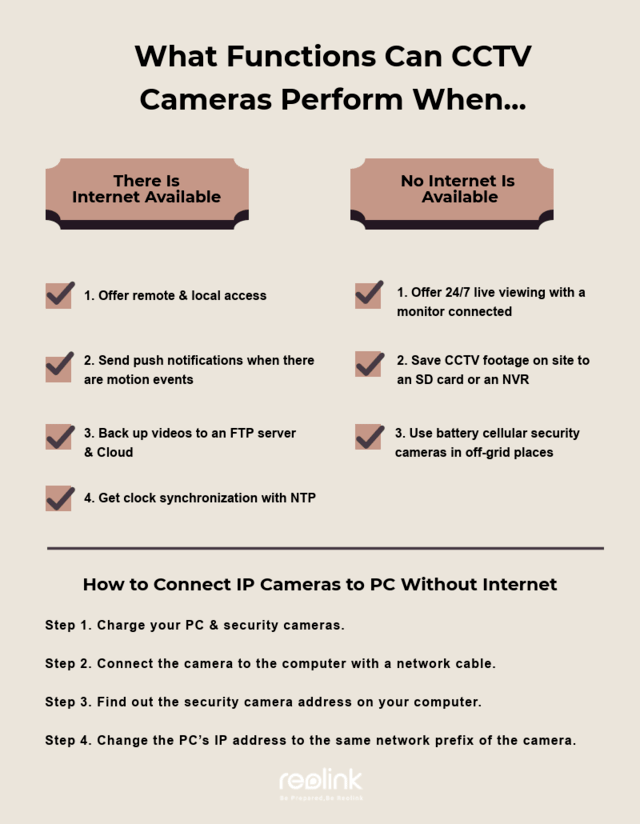
Offline security cameras provide a reliable solution in areas with poor internet connectivity. They ensure continuous monitoring, even during internet outages. This makes them ideal for remote locations or places with unstable internet. Offline cameras also offer enhanced privacy as they do not transmit data over the internet.
These cameras store footage locally, usually on an SD card or a dedicated DVR system. This local storage means that only authorized individuals can access the recordings. Offline cameras can deter intruders who may attempt to disable internet-connected systems.
Common Misconceptions
Many believe offline cameras lack advanced features. This is not true. Modern offline cameras come with motion detection, night vision, and high-resolution recording. Some even have mobile alerts and remote viewing through local networks.
Another misconception is that offline cameras are harder to install. They are, in fact, straightforward to set up. Most systems come with user-friendly installation guides. Users can easily mount and configure the cameras without needing professional help.
Some assume offline cameras are more expensive. While prices vary, many affordable options exist. These cameras provide excellent value considering the security and privacy they offer.
| Feature | Offline Cameras |
|---|---|
| Internet Dependency | No |
| Data Privacy | High |
| Installation Ease | Easy |
| Advanced Features | Available |
| Cost | Varies |
Credit: reolink.com
Benefits Of No Wifi Security Cameras
Security cameras that do not rely on WiFi offer unique benefits. They provide a reliable and private solution for your security needs. Let’s explore some key advantages of no WiFi security cameras.
Enhanced Reliability
No WiFi security cameras are more reliable. They do not depend on internet connections. This means fewer disruptions in monitoring. Internet outages will not affect their performance.
These cameras use wired or battery power. This ensures consistent operation. You won’t face issues due to weak or lost WiFi signals. The risk of interference from other devices also reduces. This makes them ideal for areas with poor internet connectivity.
In summary, no WiFi security cameras offer a stable and uninterrupted surveillance solution.
Improved Privacy
No WiFi security cameras provide better privacy. They do not connect to the internet. This reduces the risk of hacking. Your footage remains secure and inaccessible to outsiders.
These cameras often store data locally. This can be on a memory card or a dedicated hard drive. Local storage means you have full control over your recordings. There is no need to worry about data breaches on the cloud.
For those who prioritize privacy, no WiFi security cameras are an excellent choice. They ensure your surveillance footage stays private and secure.
Types Of No Wifi Security Cameras
Security cameras without WiFi are perfect for areas with no internet access. These cameras provide surveillance without relying on wireless networks. There are two main types of no WiFi security cameras. Let’s explore them.
Analog Cameras
Analog cameras are traditional security cameras. They send video over cable to a recording device. This device, usually a DVR, stores the footage. Analog cameras have been used for years. They are reliable and often cost-effective. They are ideal for basic surveillance needs.
Digital Cameras
Digital cameras, also known as IP cameras, offer higher resolution. They record and store video digitally. These cameras can work without WiFi by using local storage. Many come with SD card slots or USB ports. Digital cameras provide clearer images than analog cameras. They are suitable for detailed surveillance tasks.
Key Features To Look For
Choosing a security camera without WiFi can be challenging. It requires careful consideration of several key features. Here’s what to keep in mind:
Resolution Quality
The resolution quality of a security camera is crucial. Higher resolution means clearer images. Look for cameras with at least 1080p resolution. This ensures you can see details like faces and license plates. Some cameras offer 4K resolution for even better clarity. Remember, a clear image is vital for identifying intruders.
Storage Options
Storage options are another key feature to consider. Security cameras without WiFi often rely on local storage. This can include SD cards or external hard drives.
| Storage Type | Pros | Cons |
|---|---|---|
| SD Card |
|
|
| External Hard Drive |
|
|
Consider the pros and cons of each storage type. Choose the one that best fits your needs.
Installation And Setup
Installing and setting up a security camera without WiFi can seem daunting. But with a clear guide, the process becomes straightforward. This section provides essential steps for a smooth installation and setup.
Choosing The Right Location
The first step is to choose the right location. Select a spot that covers key areas like entry points. High, out-of-reach places deter tampering. Ensure the camera has a clear, unobstructed view.
Consider the lighting conditions. Avoid direct sunlight to prevent glare. Opt for shaded or evenly lit areas. This ensures clear footage day and night.
Wiring And Power Supply
Next, focus on wiring and power supply. Use quality cables for a reliable connection. Measure the distance from the camera to the power source. This ensures you have enough cable length.
Secure the cables along walls or ceilings. This prevents tripping hazards and keeps the setup neat. Use cable clips or conduits for added protection.
For power, plug the camera into a nearby outlet. If the outlet is far, use an extension cord safely. Make sure the power source is stable to avoid interruptions.
Recording And Storage Solutions
In the world of security cameras without WiFi, finding effective recording and storage solutions is crucial. These systems ensure that all captured footage is securely stored and easily accessible for later review. Here, we delve into two popular options: DVR systems and local storage devices.
Dvr Systems
Digital Video Recorder (DVR) systems are a reliable choice for security cameras without WiFi. These systems record video directly from the cameras to a hard drive.
Key benefits of DVR systems include:
- Continuous recording capabilities
- Large storage capacity
- Ease of access for playback and review
Most DVR systems come with multiple channels, allowing you to connect several cameras at once. This provides comprehensive coverage of your property.
Local Storage Devices
For more straightforward needs, local storage devices offer a convenient solution. These devices store footage directly on-site, often within the camera itself.
Common types of local storage devices include:
- SD Cards: Easy to use and swap out when full.
- USB Drives: Portable and simple to connect to various devices.
- External Hard Drives: Larger capacity for extended recording periods.
Local storage devices are often used for smaller setups or where network connectivity is limited. They provide an easy and cost-effective way to keep footage secure.
In summary, both DVR systems and local storage devices offer effective solutions for recording and storing security camera footage without WiFi. Your choice will depend on your specific needs and setup requirements.
Maintenance And Troubleshooting
Maintaining and troubleshooting your security camera with no WiFi connection is essential for consistent performance. Regular checks can help prevent issues, and knowing common problems can make fixes easier. This guide will walk you through the necessary steps to keep your system running smoothly.
Regular Checks
Performing regular checks on your security camera is crucial. Inspect the power supply to ensure the camera is receiving enough power. Check the cable connections to make sure they are secure and undamaged.
- Verify the power source
- Inspect cables for wear and tear
- Clean the camera lens
- Test the camera’s functionality
These simple tasks can prevent many common issues. A clean lens ensures clear footage. Secure cables ensure constant power and data flow.
Common Issues And Fixes
Some common issues can occur with security cameras that do not use WiFi. Here are some problems and their solutions:
| Issue | Fix |
|---|---|
| No Power | Check the power supply and replace if necessary. |
| Blurry Image | Clean the lens and adjust the focus. |
| No Recording | Ensure the storage device is connected and has space. |
| Interference | Move the camera away from other electronic devices. |
If your camera has no power, the power supply might be faulty. Replace it and test the camera again. A blurry image often means the lens is dirty. Clean it with a soft cloth. If the camera isn’t recording, check the storage device. It might be full or disconnected. For interference issues, ensure the camera is placed away from other electronics.
Best Use Cases
Security cameras that do not require WiFi are essential in many scenarios. These cameras ensure safety and monitoring without the need for internet connectivity. They are reliable in remote areas and high-security environments. Let’s explore the best use cases for these cameras.
Remote Areas
Remote areas often lack stable internet connections. Security cameras without WiFi are perfect for such places. Farms, forests, and construction sites can benefit greatly. These cameras can operate on batteries or solar power. They offer peace of mind where WiFi is unreliable.
Wildlife monitoring is another use case. Researchers can observe animals in their natural habitats. They do not need to worry about internet access. These cameras store footage on local storage. It ensures data is safe and accessible when needed.
High-security Environments
High-security environments need reliable surveillance. Banks, military bases, and government buildings require constant monitoring. WiFi can be a weak link in these settings. Security cameras without WiFi reduce the risk of hacking.
These cameras can work with closed-circuit systems. They provide a secure and private surveillance network. Security personnel can monitor live feeds without internet dependency. It ensures that the surveillance system is always operational.
In prisons, security cameras without WiFi ensure safety. They prevent inmates from tampering with the system. Authorities can maintain strict surveillance without interruptions.
Future Of No Wifi Security Cameras
The future of no WiFi security cameras looks promising. These devices offer reliable surveillance without internet dependency. As technology evolves, no WiFi security cameras are expected to become more advanced. This section explores the future potential of these innovative security solutions.
Technological Advancements
New technologies enhance the functionality of no WiFi security cameras. Improved battery life is one key advancement. These cameras can now run longer without needing frequent recharges. This ensures continuous surveillance over extended periods.
Enhanced storage solutions are also emerging. Modern no WiFi cameras now use advanced SD cards with higher capacities. This allows for more footage storage without the need for cloud services.
Another significant development is high-resolution video recording. Future no WiFi cameras will likely offer 4K resolution. This provides clearer and more detailed footage, crucial for identifying details.
Potential Limitations
No WiFi security cameras do have some limitations. Limited remote access is one major concern. Without internet connectivity, users cannot monitor their premises from afar.
Another potential limitation is storage capacity. Even with advanced SD cards, storage space can fill up quickly. Users need to regularly check and clear old footage to make room for new recordings.
Finally, no WiFi cameras may lack some smart features. Features like real-time alerts and integration with smart home systems require internet access. This could limit their functionality compared to WiFi-enabled counterparts.
Credit: www.familyhandyman.com
Credit: reolink.com
Frequently Asked Questions
What Are Security Cameras Without Wifi?
Security cameras without WiFi are surveillance systems that don’t rely on internet connections. They store footage locally on SD cards or hard drives. These cameras offer reliable security even without internet access.
How Do Non-wifi Security Cameras Work?
Non-WiFi security cameras record footage directly to internal storage like SD cards. They can also connect to DVR systems. This ensures your security footage is always accessible and not dependent on internet connectivity.
Are Non-wifi Cameras More Secure?
Yes, non-WiFi cameras are often more secure. They don’t transmit data over the internet, reducing hacking risks. Local storage ensures footage is less vulnerable to cyber-attacks.
Can I View Footage From Non-wifi Cameras?
Yes, footage from non-WiFi cameras can be viewed. Typically, you need to access the storage device directly, such as an SD card or DVR.
Conclusion
Security cameras without WiFi offer simplicity and reliability. They work even during internet outages. Ideal for areas with poor WiFi. These cameras provide peace of mind and security. Choose the right model for your needs. Ensure it meets your requirements for safety.
Simple setup makes them user-friendly. Consider investing in one for your home or business. Enjoy greater security without WiFi hassles. Make the smart choice today. Stay safe and secure effortlessly.